 Sidecart
Paste a list from WhatsApp or Messages
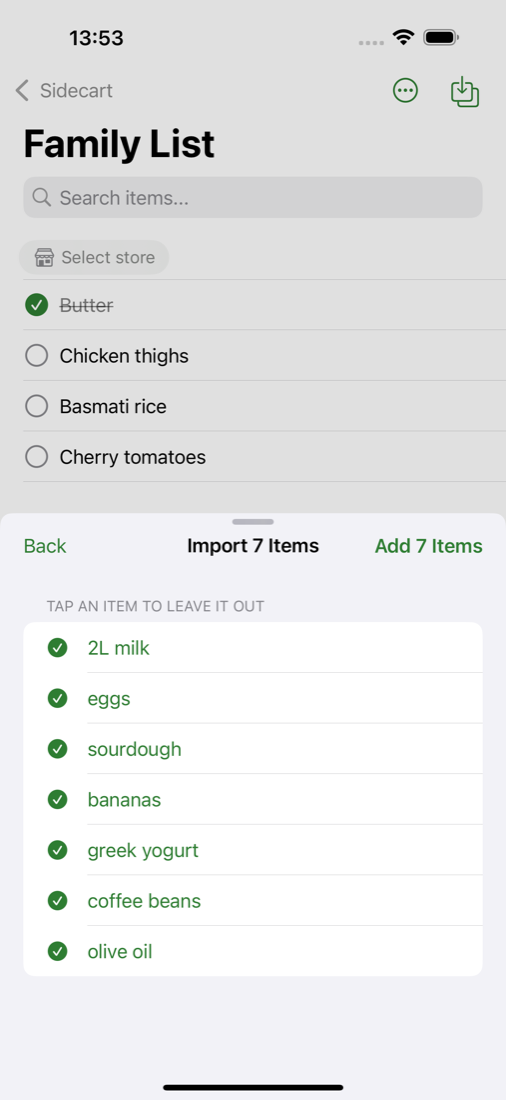
When someone sends you the shopping as a message, you don't have to retype it. Sidecart splits the text into items and lets you check them before they go on the list.
Paste a message
- Copy the message in the chat.
- Open your list in Sidecart and tap the import button at the top right.
- Paste the text. Sidecart shows the items it found.
- Tap any item you don't want, then add the rest.
Share it straight from the other app
In WhatsApp, Messages, Notes or Mail, select the text, tap Share and choose Sidecart. The same preview opens, and you pick which list the items go to.
Type several items at once
In the Add an item field, separate items with commas: "milk, eggs, bread" adds three items.
What it understands
- One item per line, or items separated by commas.
- Bullets, dashes and numbering at the start of a line are removed.
- Amounts stay with the item, including decimal commas such as "1,5 kg potatoes".
The text is read on your iPhone. It isn't sent anywhere to be processed.